Version 9
|
Category: Content
The following tables compare features of all versions of Projetex. These tables show new features in every Projetex version. Main features are the same in all versions.
| Departments | Projetex 2005 | Projetex 2006 | Projetex Version 7 | Projetex Version 8 |
| System Administrators |
|
|
|
|
|
General Management |
|
|
|
|
|
Sales Representatives |
|
|
|
|
|
Project Managers |
|
|
|
|
|
Human Resources Managers |
|
|
|
|
|
Corporate Experts |
|
|
|
|
|
Accountants |
|
|
|
|
| Departments | Projetex Version 9 | Projetex Version 10 | Projetex Version 3D |
| System Administrators |
|
|
|
|
General Management |
|
|
|
|
Sales Representatives |
|
|
|
|
Project Managers |
|
|
|
|
Human Resources Managers |
|
|
|
| Corporate Experts |
|
|
|
| Accountants |
|
|
|
Projetex 5D is the Leading Translation Management System for Translation Agencies
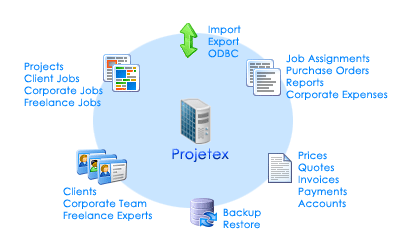
It tremendously simplifies task of corporate and freelance workflow management, data and files sharing within company and provides multiple benefits for each team member.
| Download a free 30-day trial | Order Projetex | More about Projetex |
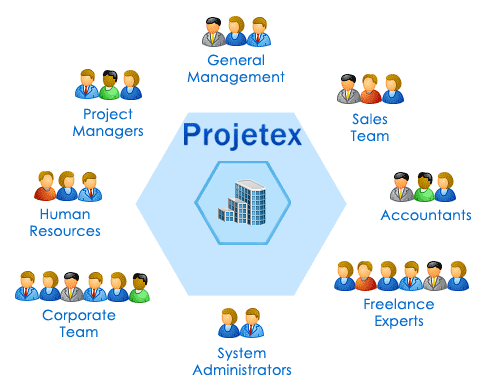
System Administrators, General Management, Sales Representatives, Project Managers, Human Resources Managers, Corporate Experts, and Accountants will be able to quickly learn Projetex 5D and upgrade their work processes. Projetex will also suit smaller work environments where single team members may have two more of these roles combined.
| Download a free 30-day trial | Order Projetex | More about Projetex |
Benefits of particular value for System Administrators of Translation Agencies are:
 Reliable Database Platform: Microsoft SQL Relational Database;
Easy Maintenance: Database Backups, Database Updates and Database Upgrades;
Remote Offices Management: Fast connectivity over both LAN and Internet;
Excellent Interface: Low Time and Low Costs of Extra Training for Translation Team Members;
Flexible Security: Manageable Access to Every Area of a Database;
Easy Customization: To Meet the Specific Needs of Your Translation Agency;
Scalability: Reliable work with simultaneous access of multiple workstations to the server;
Concurrent Access: Automatic temporary record lock during editing operations to prevent loss of data when 2 or more users within translation agency attempt to modify the same record. When one user edits data, other users can open data record in View mode;
Active Server connections can be displayed in Projetex 5D Administration Settings;
List of online users can be viewed from Projetex 5D Workstation;
Faster database server: FastFire ® Connectivity technology enables Projetex database core to work 50% faster over LAN and 15(!) times faster over the Internet than previous versions.
Benefits for General Management of Translation Agencies:
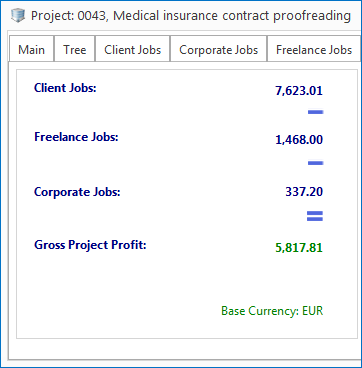
Multiple currencies support: Accounting is possible using multiple currencies, which are automatically converted into your company’s Base Currency. Accounts of Clients and Accounts of Freelancers are clearly visible at any moment in time.
Account management system: Project Accounts are based on Client Jobs Totals, Corporate Jobs Totals (calculated as Average Hourly Rate of Corporate Experts’ Time Spent on Project), and Freelance Jobs Totals, and provide good indicator of particular project profitability.
File storage automation: All rights to files and folders are assigned automatically. Translators and project managers work locally with their assignments and upload them to server as soon as they are ready.
Included FastReport engine allows creating of Custom Reports to extract any accounting, financial and other information from Projetex database in the form of tables, charts, diagrams, etc.
Customizable corporate workflow documents: Job assignments, purchase orders, invoices, quotes are saved in .rtf files using fully customizable templates.
Improved file manager: Now with a few clicks all relevant folders (for example, all job assignment and purchase order folders of a given project) can be opened in the second field of Files tab.
AnyCount 5D: Projetex 5D now features built-in bestselling AnyCount Enterprise edition text count engine. Numbers in AnyCount notes are now aligned into distinct columns.
Benefits for Project Managers of Translation Agencies:
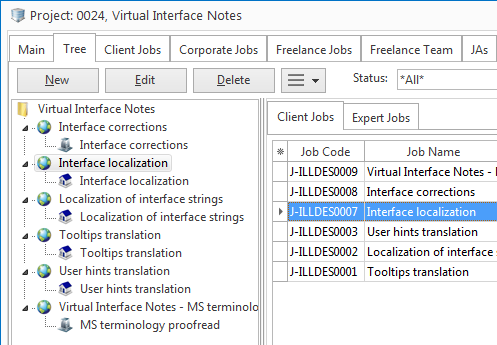
Comprehensive projects structure:Tree-like view of project showing corporate jobs and freelance jobs, which correspond to each client job. Clear distinction between corporate jobs (jobs done within translation agency) and freelance jobs (jobs done by individual external experts or vendors).
Job quality assessment: Projetex provides ability to rate quality of each expert job and take in consideration average quality of jobs when selecting them.
Search options: Easy-to-use search of freelancers by prices. Easy-to-use search of freelancers by completed jobs.
Freelance expert teams: Every project has a Freelance Team, which allows to shortlist eligible translators before making final choices.
Detailed filters with various time and status spans: Project records can be filtered by various conditions including Not Completed, Not Completed — Overdue, Not Completed — Due Today, Not Completed — Due in the next 5 days, and so on. Color highlights for current projects and jobs: deadline is in the future, deadline is today, deadline is in the past.
Quick expert assignment: Single-click issuing and tracking of Job Assignments for Corporate Experts and Purchase Orders for Freelance Experts.
Custom fields in most sections of Projetex for even more database customization.
Project file management options: Projetex automatically creates and maintains consistent and logical folder structure. Project files can be quickly accessed without the need to switch between Projetex and file explorer windows.
Built-in FTP client: available directly on Files tab for quick access to Clients and Experts FTP folders.
| Download a free 30-day trial | Order Projetex | More about Projetex |
Benefits of particular value for Accountants are:
Automatic numbering of workflow documents: Automatic global invoice numbering, as well as additional client-specific invoice numbering. Automatic global numbering of purchase orders to freelancers, as well as additional freelancer-specific PO numbering. Automatic expert-specific numbering of Job Assignments to corporate translators and other experts. Client-specific numbering of quotes, jobs, and payments. Expert-specific numbering of quotes, jobs, and payments.
Invoice management: Overview of all due and overdue invoices to clients, dates of expected payments displayed.
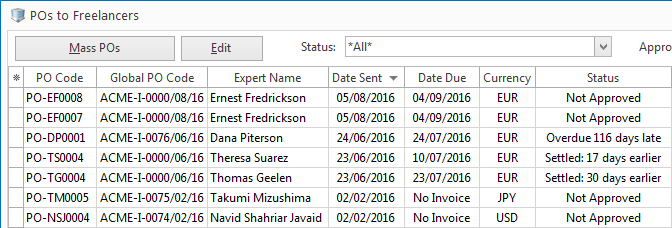
Purchase order management: Overview of all due and overdue purchase orders issued to freelance experts.
Flexible system of linking payments with invoices: Multiple invoices can be paid by single payment, single invoice can be paid by multiple payments. Ability to enter special phantom payments and phantom invoices to settle negligent amounts.
Currency exchange rate calculation: Client Currency, which differs from Company’s Base Currency can be set up for payments from clients in other currency. Expert Currency, which differs from Company’s Base Currency can be set up in cases, when there is a need to pay expert in his or her particular currency.
Account-based management of Projects and Client: Account Managers now are assigned Accounts instead of Clients. Client can be a single account (as before) or multiple accounts, with a number of Projects and Account Managers assigned to them.
Mass action: Quick generation of multiple Invoices, Purchase Orders and Payments.
Invoicing policy settings can be configured in client’s profile, providing the ability to track if a client job is ready for invoicing.
Phantom payment and invoice notes can now be added.
Benefits for Corporate Experts:
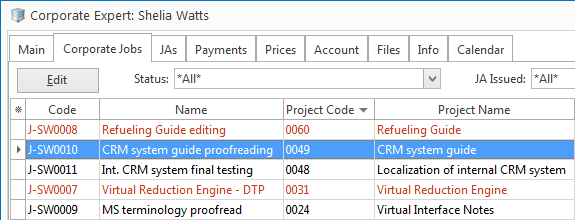
Completed jobs management: an expert can keep the records of all jobs done.
Time management: Easily see how much time is left for particular job.
Done, Due today and Overdue job status: Clearly see which jobs are done, due today and overdue.
Work files management: Quickly navigate in the folders of job assignments.
| Download a free 30-day trial | Order Projetex | More about Projetex |
Benefits for Sales Representatives:
Consistency in pricing is maintained through General Prices and Prices relationship. There are main General Prices, which serve as a reference point, and custom Prices for each client.
Recording of both prices and quotes allows to be both selective and consistent in pricing.
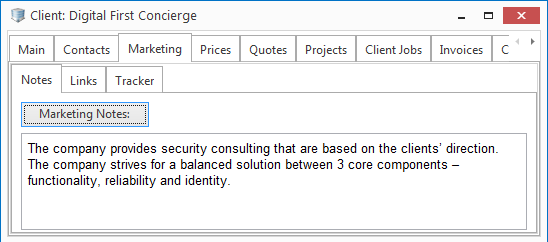
Marketing Notes, which can be used to maintain a kind of client dossier, to better understand their needs.
Marketing Notes, which can be used to maintain a kind of client dossier, to better understand their needs.
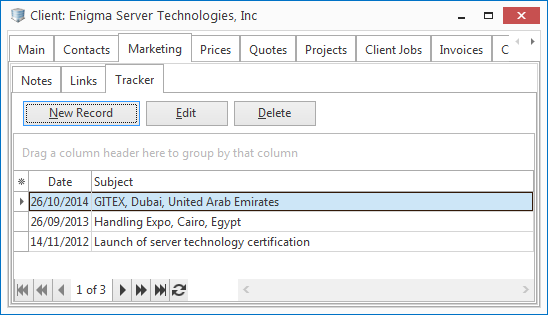
Marketing Tracker: A user can keep track of negotiation path and prospecting history.
Custom Fields: Ability to add custom fields to Client Profile.
Benefits for Human Resources Managers:
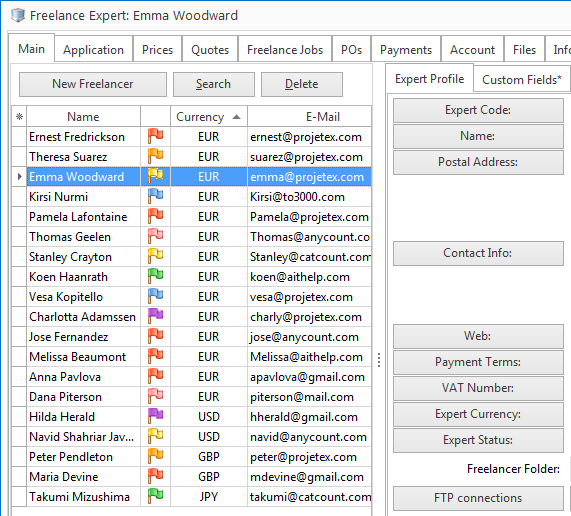
Freelance experts database: Ability to create and continuously enhance shared database of freelance experts.
Custom fields: Unlimited number of custom fields for freelance experts database, with various types: Number, CheckBox, String, Text, Date, Time, and so on.
Application Notes: Together with Application Tracker, Application Notes enable a user to track progress of particular applicant through translation agency’s application process.
General Prices for Freelancers: Accessible as reference source, serve as guidelines for acceptable prices for translation agency’s projects.
And many other benefits for System Administrator, General Management, Sales Representatives, Project Managers, Human Resources Managers, Corporate Experts, and Accountants!
| Download a free 30-day trial | Order Projetex | More about Projetex |
Version 8.5
Comprehensive and Easy-to-Use File Management:
- Projetex8Lock and Unlock – signal to your colleagues that you are working on the files
- Version Control – keep history of all changes to the files. Download any past version of the file.
- Team>Upload Changes and Team>Clear Locks. Makes end of business day team-friendly and hassle-free.
- Better Compatibility with Windows 7.
- Better Compatibility with Windows Vista.
- Better compatibility with Windows Firewall.
- New Feature: Drag&Drop in Files.
- Multiple Other Enhancements.
- 10% increase in speed for databases with large amounts of data.
FastFire ® Connectivity – Fast connectivity over both LAN and Internet using technology. Developed during recent 4 years
 Build 719/7019 – 16 August 2010
- Percentage of Gross Freelance Production based on POs in Balance tab of Freelancer window is now calculated properly.
- Assigned date of new corporate/freelance job from Projects > Project > Tree tab is now based on proper date of client job instead of 30/12/1899.
- Excel AutoFilter in XLS format of Local Reports now works properly.
- Minor fixes in headers and footers of Local Reports.
Powered by Projetex

Acceslangues aims to open the door to the world via effective communication. It specialises in assisting companies that use cutting-edge technologies. The team of linguists and technical consultancy professionals are all specialists in high-tech fields. Acceslangues combines these linguistic and technical skills to provide on-site or remote translation, interpreting or language training services.
acceslangues.com
Business Cases

|
McFelder Translations and Projetex: the control over the entire translation process McFelder Translations (Banyoles, Spain) is a quality accredited translation company that specialises in the translation of technical and scientific texts. The company applies the highest standards of Language Localisation, by ensuring that any Interpreting or Translation project is conducted and proofed by native speaker specialists. Projetex Licenses: 1 Server, 5 Workstations |